
箱ひげ図: 強力なデータ視覚化ツール
箱ひげ図は、データセットの主要な統計的尺度 (最小値、第 XNUMX 四分位値、中央値、第 XNUMX 四分位値、および最大値) を示すグラフ表現です。 データの分布と歪度を視覚化するためにデータ分析で広く使用されています。
イントロダクション
The 箱ひげ図(別名:箱ひげ図)は、データセットの5つの要約値(最小値、第1四分位数(25パーセンタイル)、中央値(50パーセンタイル)、第3四分位数(75パーセンタイル)、最大値)をグラフで表したものです。1970年代にジョン・テューキーによって開発されたこのグラフシステムは、データセットの分布を簡潔に表現できるため、 データ分析 process.
強力なツールですデータ分析において非常に強力なツールです。データセットの中心傾向、分散、歪度を明確に示すことができるからです。さらに、外れ値を効果的に視覚化し、データ分布の全体像を把握できます。これは、複数のデータセットを比較する際に特に役立ちます。異なるデータ分布を明確かつ比較可能な形で視覚化できるからです。
ハイライト
- 箱ひげ図は、データセットの XNUMX つの重要な統計的尺度をグラフィックで表します。
- ボックス内の中央値は、データの中心傾向を示します。
- ボックスの端を示す四分位数 Q1 と Q3 は、データの分散を反映しています。
- 箱ひげ図のひげは、外れ値ではない最小および最大のデータ ポイントに達します。
- 外れ値は、(Q1 – 1.5IQR) を下回るか、(Q3 + 1.5IQR) を上回るデータ ポイントとして計算されます。
広告タイトル
広告の説明。 Lorem ipsum dolor sit amet, consectetur adipiscing elit.
箱ひげ図の重要なコンポーネント
A 箱ひげ図、主要な統計指標を視覚的に表現する汎用性の高いツールです。複数の構成要素から成り立っており、それぞれがデータ分布に関する独自の洞察を提供します。
箱ひげ図の中心となるのは中央値であり、箱の中の線で表されます。第2四分位数(Q2)の中央値は、データを2つの半分に分ける中央の値です。これは中心傾向を測定し、データの中心を概観するものです。
次に、ボックスは第1四分位数(Q1)といった第3四分位数(Q3)によって定義されます。これらの四分位数は、それぞれデータセットの25パーセンタイルと75パーセンタイルを表します。Q1マークはデータの前半の中央値を表し、Q3は後半の中央値を表します。
箱の長さは四分位範囲(IQR)であり、第3四分位数(Q3)から第1四分位数(Q1)を引いて計算されます(IQR = Q3 - Q1)。IQRはデータの中央50%を測定し、データのばらつきや広がりを表します。
The ひげは、ボックスから伸びて、外れ値ではない最小値と最大値のデータポイントに到達する線です。通常、下側のヒゲは第1四分位数(Q1)から外れ値ではない最小値のデータポイントまで伸び、上側のヒゲは第3四分位数(Q3)から外れ値ではない最大値のデータポイントまで伸びます。
外れ値通常、(Q1 - 1.5 の下にあるデータポイントとして計算されます。IQR) またはそれ以上 (Q3 + 1.5位置するデータポイントとして計算されます。これらの外れ値は、箱ひげ図のひげの外側にある個々の点として表されます。
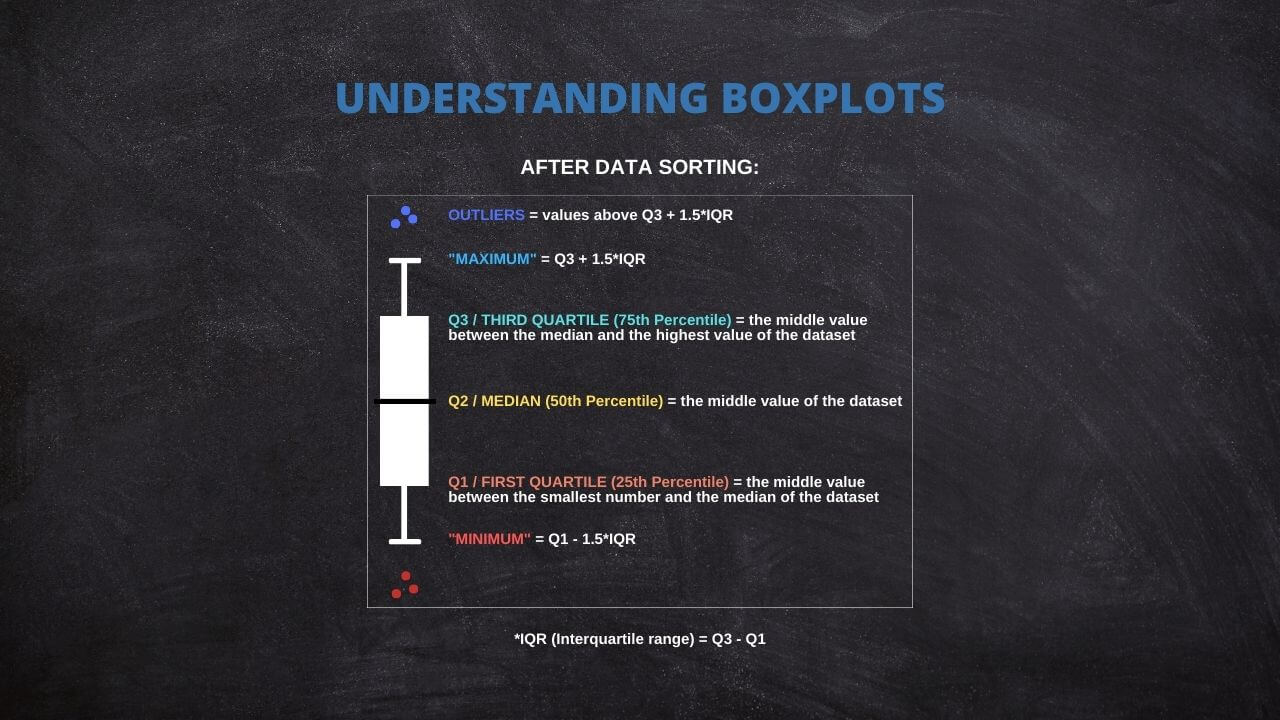
箱ひげ図のこれらのコンポーネントを理解すると、データの分布、広がり、歪度を迅速に理解できるようになります。 また、潜在的な外れ値の特定と視覚化にも役立ち、データ分析において非常に役立ちます。
独自の箱ひげ図の生成: インタラクティブなツール
インタラクティブな箱ひげ図を作成するには、次の手順に従ってください。
1. ボックスプロットの数:作成したいボックスプロットの数を入力してください。
2. X軸ラベル:X軸に表示したいラベルを入力してください。
3. Y軸ラベル:Y軸に表示したいラベルを入力してください。
生成する箱ひげ図ごとに、次の情報を入力します。
4. ボックスプロット名:各ボックスプロットに一意の名前を入力してください。
5. 箱ひげ図データ:各箱ひげ図のデータを、指定されたテキストエリアに入力してください。1行につき1つのデータポイントを入力するようにしてください。
データを入力したら、「プロットを更新」ボタンをクリックして箱ひげ図を生成します。
Guide to Create a Box Plot on R
R is a go-to language in data science because of its statistical computation and graphic generation robustness. Let's take a quick tour of creating a Box Plot using R.
Firstly, install and load the ggplot2 package:
install.packages("ggplot2")

library(ggplot2)
Suppose you have a dataset and wish to create a box plot of a variable, var. The code snippet would be:
ggplot(data, aes(x = "", y = var)) +

  geom_boxplot() +

  theme(axis.title.x=element_blank())
This creates a simple box plot. To add more complexity or visual features, ggplot2 offers a other options that can be appended to this code.
Practical Applications of Box Plot
Box Plots find their usage in a wide range of real-world applications. For instance, box plots can be used in healthcare to compare the effectiveness of different drugs or treatments. They may be used in finance to compare the performance of other investment portfolios.
A powerful application of box plots is in A/B testing, where they can help determine if there's a significant difference between the groups. Furthermore, they're frequently used in exploratory data analysis for identifying outliers and understanding the data distribution.
The Versatility of Box Plots
While the traditional components of a Box Plot include the minimum, first quartile (Q1), median, third quartile (Q3), and maximum, it's worth noting that some statistical software offers flexibility in defining these measures.
For instance, specific programs allow replacing these traditional measures with others, such as mean, standard deviation (SD), confidence intervals (CI), etc. This adaptability will enable users to tailor their box plots to suit their specific analytical needs or preferences.
Thus, box plots remain not just a fundamental tool for data visualization but a versatile one that can be customized across different software platforms. Always review the documentation or the settings of your chosen statistical software to fully leverage these capabilities.
Common Misconceptions When Using Box Plot
Box Plots can sometimes be misinterpreted despite their utility, leading to flawed conclusions. A common misconception is to equate the box's length with the number of data points. In reality, it represents the data's spread.
Another error is in the interpretation of outliers. Outliers are not necessarily "bad" data points to be eliminated but may provide important insights about the dataset. Therefore, careful consideration is required before any decision to remove them.
Lastly, while box plots are efficient for summarizing data, they do not show the data's shape in detail, as a density plot or a histogram would. Therefore, they are best used with other data visualization tools for a more complete data analysis.
Ad Title
Ad description. Lorem ipsum dolor sit amet, consectetur adipiscing elit.
Recommended Articles
Interested in learning more about statistics and data analysis? Explore our blog for more articles and tutorials that will help you enhance your data skills!
- How To Select The Appropriate Graph?
- Create Great Graphs Easily (+Bonus)
- Which is Better, Mean or Median?
- Boxplots - an overview (External Link)
- How to Create Regression Lines in Excel
- Box Plot Skewness: A Visual Guide to Asymmetry
Frequently Asked Questions (FAQ)
It's a graphical representation of a five-number summary of a dataset: minimum, Q1, median, Q3, and maximum.
Box Plots provide a visual summary of data distribution. They are handy for identifying outliers and skewness in the data.
The box represents the IQR, covering 50% of data points from the first quartile (Q1) to the third quartile (Q3).
The line inside the box signifies the median, a measure of the data's central tendency.
Outliers are typically represented as individual points outside the whiskers in the box plot.
Outliers are usually calculated as data points that fall below (Q1 - 1.5IQR) or above (Q3 + 1.5IQR).
Some statistical software allows replacing traditional measures with others such as mean, standard deviation, confidence intervals, etc.
Whiskers extend from the box to the minimum and maximum non-outlier data points, thus showing the range of the data.
You can input your data and create a box plot with statistical software like R or Python or an interactive web tool.
Yes, Box Plots are widely used in fields like healthcare, finance, and A/B testing for quick visualization and interpretation of data.